Muster
Guild recruitment coordination for World of Warcraft communities, right inside Discord.
How it works
1
Apply in Discord
Run /apply in your community's server to get a private, time-limited link.
2
Link & choose
Sign in with Battle.net, then pick the character and guild you want to apply with.
3
Get invited
Officers see you're online and reachable, coordinate with you, and invite you in-game.
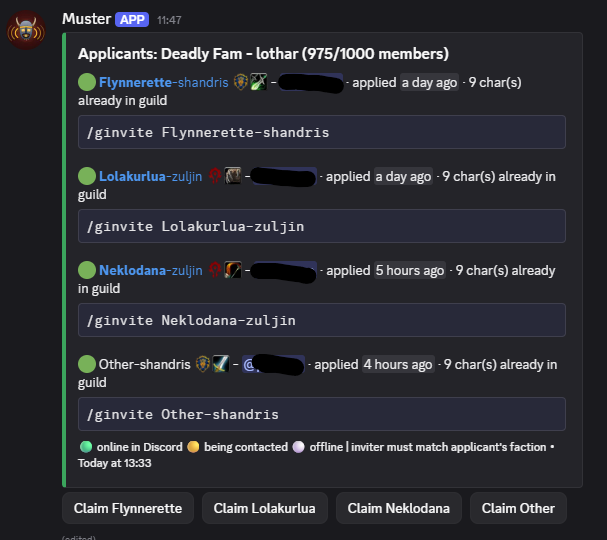
What you get
- ✓ Faction and class shown at a glance, plus a ready-to-copy
/ginvite name-serversnippet for every applicant. - ✓ Officers can optionally "claim" an applicant to coordinate with them, so nobody double-messages the same person.
- ✓ Characters over level 10 link to their WoW profile, so you can vet gear and experience before inviting.
- ✓ Connect multiple guilds to one community - built for guilds that have outgrown the 1000-member cap.
- ✓ Optional per-guild player caps warn applicants and officers, without blocking the application.
For members
Applying to a guild
- Run
/applyin the community's Discord server. - Follow the link and sign in with your Battle.net account.
- Pick the character and guild you're applying to.
- Submit - an officer will message you here on Discord when it's time to invite you.
For officers
One-time setup
/guild-config init-community- register this server/guild-config add-guild- add each in-game guild/applicants register-board- post the live board/guild-config set-officer-role- optional, restrict who can claim/decline. Defaults to users with "Manage Server"
Setup tips
Register the board in a channel that doesn't allow members to post - Muster only needs permission to send messages and embed links itself. We'd still leave the channel visible to everyone, though, so any guildie who can invite can see who's online and reachable.
Running multiple guilds? A channel per guild keeps things tidy, e.g. "applications-main" and "applications-alt".
A few things to know
- "Online" on the board means reachable on Discord right now - not necessarily logged into WoW - since officers still need to message applicants to coordinate.
- Applications resolve automatically once the character shows up on the guild's roster.
- Muster never sends the in-game invite itself - a same-faction officer still types
/ginvitein-game. - After a month of inactivity the application board will be deactivated. It will automatically reactivate when someone applies or with manual reactivation.